Use the Project Plan Summary dashpart to view a summarization of the project's labor, expense, and consultant JTD and ETC billing amounts at the project level. This dashpart provides one detailed view that shows how the project is trending against the contract amount as of the current date.
Contents
As indicated on the legend, the JTD, ETC (Navigator), and Contract are color coded so that you can easily compare their amounts at a glance. The JTD and ETC (Navigator) are shown together on a bar, which allows you to summarize how they are trending simply by the colors that represent the amounts. In addition, the contract displays as a separate horizontal line across the chart, which provides a contrasting visual so you can quickly see how close the JTD and ETC are to the contract. It can even show these amounts as higher than the contract, which indicates a project that is currently over budget and requires review.
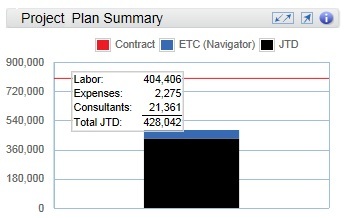
For more detailed information about each of these amounts, their respective totals, and their calculations, you can hover over or tap the bar or the line. For example, when you hover over the JTD (black) portion of the bar, the JTD calculation and total display. You can see the actual amounts for the planned labor, expenses, and consultants that are pulled directly from their respective Planning pages, and how they are applied to the calculation for the Total JTD.
Then, you can hover over the ETC (Navigator) amount (blue) portion of the bar, to view the ETC (Navigator) calculation and associated amounts. You can see the actual amounts for the planned labor, expenses, and consultants that are pulled directly from their respective Planning pages, and how they are applied to the calculation for the Total ETC.
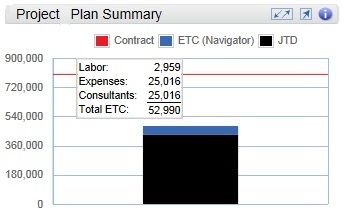
These tooltips and calculations allow you to see how the different fields on the Dashboard work together to summarize your project's status.
Note: When you view these amounts on their respective pages (for example, the Expenses amount on the Expenses page), you must change the
Bill/Cost toggle button to display billing amounts. Otherwise, the amounts that you view on the page will not match what is displayed on the Project Plan Summary dashpart.
| Field | Description |
|---|
| Contract
|
This horizontal line represents the total contract amount from the Contract planning grid.
Calculation: Labor + Expenses + Consultants
If your firm uses Vision Multicurrency, the currency amounts display in the project's billing currency or project currency. The currency is based on the
Use Billing Currency not Project Currency option in
.
|
| ETC (Navigator)
|
This portion of the bar represents Navigator's estimate-to-complete (ETC) labor amount for the project. This is the billing value of planned labor that is required from tomorrow through the end of the plan.
The ETC (Navigator) amounts are derived from the following values that display on each Planning page.
- Labor ETC = ETC amount on Labor page
- Expenses ETC = ETC (Navigator) on Expenses page
- Consultants ETC = ETC (Navigator) on Consultants page
If the Vision plan's
Budget Type is set to
Cost, this amount displays as zero. If a project is mapped on multiple Vision plans that have the
Include in utilization and project reports option selected, Navigator totals are the combined values.
If your firm uses Vision Multicurrency, the currency amounts display in the project's billing currency or project currency. The currency is based on the
Use Billing Currency not Project Currency option in
.
|
| JTD
|
This portion of the bar represents the job-to-date labor amount through today's date. It is based on actual JTD labor charges at billing and includes unposted charges.
The JTD amounts are derived from the following values that display on each Planning page.
- Labor JTD = JTD on Labor page
- Expenses JTD = JTD on Expenses page
- Consultants JTD = JTD on Consultants page
Calculation: JTD = posted and unposted labor charges at billing through today
|
| Total ETC
|
The Total ETC is derived from adding the respective ETC amounts together.
|
| Total JTD
|
The Total JTD is derived from adding the respective JTD amounts together.
|
| Tooltips
|
Tooltips display when you hover over or tap various parts of the Navigator interface, including buttons, status and warning indicators, and data on the dashparts and charts. You can also click the
 buttons to view specific calculation information, and click the
More links to access the pertinent Navigator online help. buttons to view specific calculation information, and click the
More links to access the pertinent Navigator online help.
If you are using a tablet device, the tooltip hover action is not available, but you can tap the
buttons and
More links to view the calculations and online help.
|