|
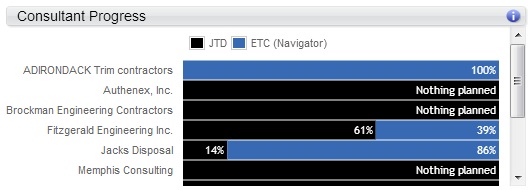
The JTD and ETC (Navigator) bars display what percent of the total planned bill or cost amount is complete through today, and what percent of the planned bill or cost amount remains for each consultant type.
- JTD: This is the sum of all consultant-related charges on posted transactions and committed purchase orders through today. For consultant names, it is the sum of all charges for the name. When no name is assigned, though, it is the sum of all charges for the account that displays for the consultant type.
- ETC (Navigator): This is the percent of the plan that remains for completion through today. For consultant names, it is the sum of all charges for the name. When no name is assigned, though, it is the sum of all charges for the account that displays for the consultant type.
ETC (Navigator) % = (ETC (Navigator)/(ETC (Navigator) + JTD)) * 100
You can view a summary of the percentages for each consultant. For example, on the following project, Fitzgerald Engineering Inc. is 61% complete.
You can also hover over each consultant's progress bar to view a summary of the amounts. For example, when you hover over Fitzgerald Engineering Inc., the respective JTD, ETC, EAC, and planned amounts and calculations display.
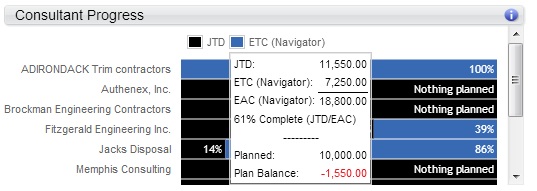
To complete this calculation, the EAC, JTD, and ETC amounts are pulled directly from the Consultants planning grid and then calculated as follows:
JTD = 11,550.00
ETC (Navigator) = 7,250.00
EAC (Navigator) = 18,800.00
% Complete = 61% (JTD/EAC)
ETC % = 39%
Because the JTD is greater than the planned amount, the Plan Balance displays in red to alert you that the project is trending to be over budget.
If there is JTD but no planned amount, the bar displays
Nothing planned.
Note: There is a potential discrepancy in the ETC (Navigator) amount versus what displays for the ETC in Vision.
|