While Deltek has attempted to verify that the information in this document is accurate and complete, some typographical or technical errors may exist. The recipient of this document is solely responsible for all decisions relating to or use of the information provided herein.
The information contained in this publication is effective as of the publication date below and is subject to change without notice.
This publication contains proprietary information that is protected by copyright. All rights are reserved. No part of this document may be reproduced or transmitted in any form or by any means, electronic or mechanical, or translated into another language, without the prior written consent of Deltek, Inc.
Draft edition published February 19, 2026.
© Deltek, Inc.
Deltek’s software is protected by copyright law and constitutes valuable confidential and proprietary information of Deltek, Inc. and its licensors. The Deltek software, and all related documentation, is provided for use only in accordance with the terms of the license agreement. Unauthorized reproduction or distribution of the program or any portion thereof could result in severe civil or criminal penalties.
All trademarks are the property of their respective owners.
Deltek ComputerEase 25.3.4 Release Notes
Release Date: February 19, 2026
Welcome to the ComputerEase 25.3.4 Release Notes, which describe the new features, enhancements, and software issues resolved in this release.
Overview
This document provides information on the following releases:
Summary of Changes
New Features and Enhancements
The following is a list of new features and enhancements for this release:- General
- Payroll System
- Maryland Electronic Filing Update
Software Issues Resolved
The following is a list of software issues resolved for this release:
- Accounts Payable
- AP Aging Report by Job Could Report Incorrectly with Period Adjustments
- Indiana 1099 Electronic File Requires State Code 18
- Job Costing System
- Editing AP Invoices Could Cost Job Cost and GL Imbalance
New Features and Enhancements
This section describes the new features and enhancements included in this release.
RFC XML Schema Update
The RFC (Request for Change Order) XML schema (rfc.xsd) has been updated with new optional fields:
- approved: Boolean.
- approvaldate: Date, required when approved is true.
- approvedby: String, optional.
- changeordernum: String, required when approved is true.
When you import an RFC, and the approved field is provided and if the RFC does not exist, the system creates it with an approved event.
(Deltek Tracking Number: 2581688)
Maryland Electronic Filing Update
When printing 1099s for Maryland, you are now prompted to enter the Central Registration Number. This is an 8-digit identification number assigned by the Maryland Comptroller's Office when you open a state withholding or tax account. This is a required field for the electronic filing of 1099s and if Maryland state tax is withheld.
To create a 1099 electronic file for Maryland, select Accounts Payable > Reports > Print 1099's >Electronic Filing > State Electronic File Creation, then select Maryland as the state. (Deltek Tracking Number: 2579851)
Software Issues Resolved
This section describes the software issues resolved in this release. Some descriptions might contain additional information, including ways on how to work around the defects.
Deltek Tracking Number: 2589146AP Aging Report by Job Could Report Incorrectly with Period Adjustments
When changing the Adjustment Period to a new period through Edit an Invoice, the AP Aging Report could report inaccurate figures.
Deltek Tracking Number: 2587917Indiana 1099 Electronic File Requires State Code 18
When creating a 1099 electronic file for Indiana, there is no option for Indiana and state code "18" is missing from the Payee "B" record in position 747-748.
Deltek Tracking Number: 2580476Editing AP Invoices Could Cost Job Cost and GL Imbalance
When editing the date of an Accounts Payable invoice, the change did not reflect on the Job Detail Report, causing discrepancies between job costing and the general ledger.
Summary of Changes
New Features and Enhancements
The following is a list of new features and enhancements for this release:- Payroll System
- State Withholding Tax Table, Rate, and SUTA Wage Base Updates
New Features and Enhancements
This section describes the new features and enhancements included in this release.
State Withholding Tax Table and Rate Updates
The 2026 withholding tax tables and rates of the following states have been updated:
- Maryland:
- Updated the standard deduction from $3,350 to $3,400.
- Updated the income tax rates of the following counties:
- Allegany County: from 3.03% to 3.2%.
- Kent County: from 3.2% to 3.3%.
(Deltek Tracking Number: 2584056)
Required Action
- Identify whether double-time wages were paid to any employee in 2025 by running the Ledger Card by Employee report. If any employees are identified, you need to run the OBBB Overtime Premium Exempt report under Payroll System > Reports > Tax Reporting.
Details and steps to run the reports can be found in KB Article 123298.
- If you have employees participating in Paid Family Medical Leave (PFML) programs for Colorado, Connecticut, Delaware, Massachusetts, Maine, New York, Oregon, or Washington, you need to run the 2025 PFML Catch-up Allocations report for each company to identify if there were any erroneous general ledger and job cost or equipment cost entries resulted after updating to version 25.3.
Details and steps to run this report are in the Enhancements section below.
Note: Employees participating in the District of Columbia (DC) PFML program were not impacted by this issue. You have no required action for this state.
Issue 1 Identified: Incorrect OBBB Qualified Overtime Premium for Double-Time Wages
Issue Summary
IRS guidance for qualified premium changed to further define that the full premium portion of double-time pay is not OBBB qualified premium, specifying the qualified premium is the pay that exceeds the employees' regular rate of pay under FLSA requirements (the "half" portion of "time-and-a-half") regardless of actual premium paid.
If you would like more details, specific guidance with examples of qualified premiums in different scenarios can be found at www.irs.gov.
Why This Is Important
Based on updated guidance from the IRS on qualified premium for double-time pay, the OBBB Overtime Premium Exempt report under Payroll System > Reports > Tax Reporting was updated to provide only the FLSA required premium paid (the "half" in "time and a half") for all double-time paid wages. Early guidance directed that the full premium for overtime above the employee's standard pay (1/2 of the 2x pay) was qualified.
Note: There is no penalty for either misreporting or incorrectly reporting premium wages for 2025 as the transition year. Refer to https://www.irs.gov/pub/irs-drop/n-25-62.pdf
Correction
The OBBB Overtime Premium Exempt report under Payroll System > Reports > Tax Reporting was updated to always provide only the IRS qualified premium for all overtime and double-time pay.
Impact
The premium amount provided to employees that were paid double-time in 2025 was over reported.
Issue 2 Identified: PFML Employer Catch-Up Calculation Issue (Versions 25.3 to 25.3.2)
Issue Summary
An issue was introduced in version 25.3 that incorrectly generated employer catch-up contributions for missed employee or employer state PFML deductions on 2025-dated payroll checks.
Employer catch-up contributions are intended to address situations where the system identifies an employer's or employee's past under-funding or missed contributions. However, per an IRS ruling effective January 1, 2026, employer catch-up calculations should only apply to 2026-dated checks forward.
Due to this issue, when running payroll in version 25.3 for an employee marked as participating in a state PFML program, the system erroneously calculated employer catch-up contributions for 2025. No employee withholding or payroll figures were impacted by this issue.
Why This Is Important
If your employer catchup contributions were calculated, your posted burden in general ledger, job cost, and equipment may be incorrect.
Correction
This issue was corrected in version 25.3.2. The fix prevents employer catch-up contributions for all state program PFML from being calculated on 2025-dated checks, ensuring compliance with IRS requirements.
Impact
Erroneous journal entries and job cost expenses associated with affected payroll checks may have resulted.
Summary of Changes
New Features and Enhancements
The following is a list of new features and enhancements for this release:- Payroll System
- OBBB Overtime Premium Exempt Report
- 2025 PFML Catch-up Allocations Report
- State Withholding Tax Table, Rate, and SUTA Wage Base Updates
Software Issues Resolved
The following is a list of software issues resolved for this release:
- Payroll System
- 1099 File Upload Error
- Connecticut PFML Catch-up Calculation Error
- Delaware W-2 Export Missing RW Record
- Long Time Entry Descriptions Crashes the Application
- Minnesota PFML Catch-up Calculation Error
- Washington PFML Catch-up Calculation Error
New Features and Enhancements
This section describes the new features and enhancements included in this release.
OBBB Overtime Premium Exempt Report
Based on updated guidance from the IRS on qualified premium for double-time pay, the OBBB Overtime Premium Exempt report under Payroll System > Reports > Tax Reporting was updated to provide only the FLSA required premium paid (the "half" in "time and a half") for all double-time paid wages. Previously, it provided the full premium for overtime above the employee's standard pay (1/2 of the 2x pay).
For detailed steps to identify which employees are impacted and the next steps to do, refer to
KB Article 123298.
2025 PFML Catch‑up Allocations Report
2025 PFML Catch-up Allocations report has been added. It is designed to identify and assist in correcting erroneous general ledger, job cost, and equipment postings related to the 2025 PFML employer catch-up issue introduced in version 25.3. If you have employees participating in PFML programs for Colorado, Connecticut, Delaware, Massachusetts, Maine, New York, Oregon, or Washington, we recommend that you run this report before closing your year for 2025.
The records listed in the report represent the correcting entries for the identified erroneous postings. When no qualifying entries are found, the report displays "No Entries to Correct". If any correction entry has already been made, review these correction entries to ensure they are not duplicates of your manual entry.
Note: If your only participating employees are enrolled in the District of Columbia (DC) PFML program, you are not impacted by this issue. No action is required for this state.
This report performs the following:
- Follows the same permissions as other PFML reports (Programs > Payroll > Access Executive Payroll Employees and Programs > Payroll > Reports > Tax Reporting > State and Local Taxes Withheld in the User Settings dialog box of PW MAINT.).
- Calculates Calculated PFML for each check using the 2025 PFML employer rates.
- Compares the calculated values to Posted PFML (GL PRSE entries) on a per‑employee, per‑check basis.
- Validates all checks dated 12/1/2025 through 12/31/2025 across all states.
- Only displays PFML entries that posted to the GL and have a variance between the posted and calculated values.
When a difference exists between Posted PFML and Calculated PFML, the following are reported:
- GL Period
- Check Date
- Employee
- Wages
- Tax Type
- Posted: PRSE amount posted to GL
- Expected: Wages * 2025 PFML Rate
- Correction: Posted PFML - Calculated PFML
- Correction Distribution, including:
- Account Number
- Debit
- Credit
- Cost Code
- Cost Type
- Equipment
- Code
Following the detailed report, an additional section summarizes journal entry totals by GL Period, providing a streamlined view to support posting the correcting entry. This summary includes:
- Account
- Total Debit
- Total Credit
- Cost Code
- Cost Type
- Equipment
- Code
The Exclude differences less than option excludes checks with variances below this threshold. The default value to exclude is less than 1.00.
To simplify downstream corrections:
- Users can easily import the report results directly into a job costing journal entry.
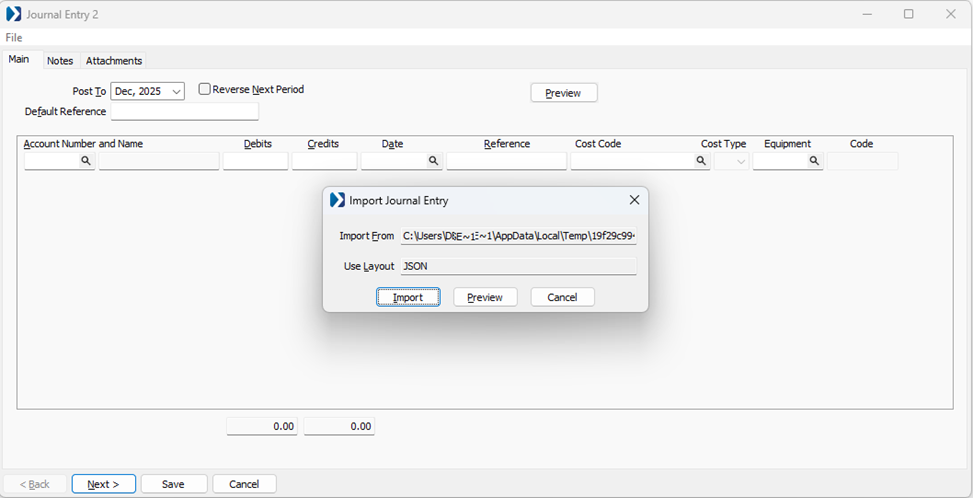
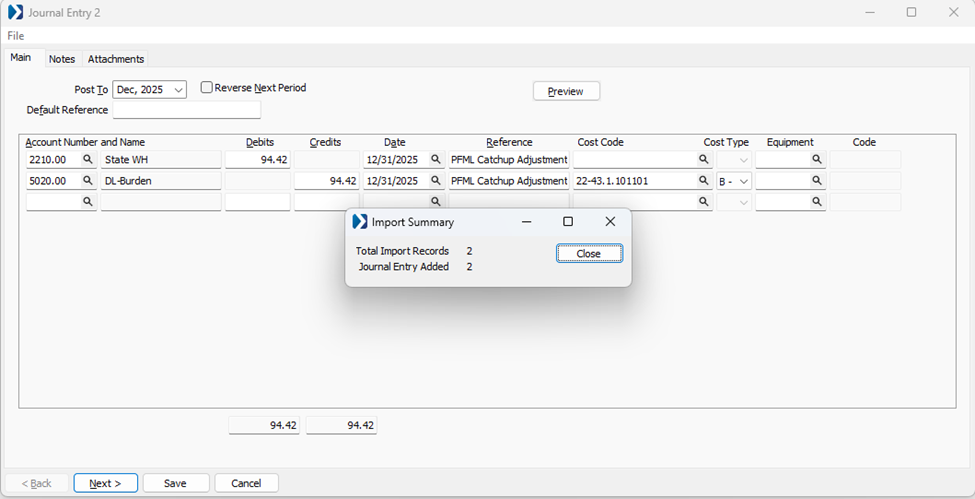
- The journal entry automatically includes Reference: "PFML Catchup Adjustment".
- The journal entry date automatically populates with the last day of the period.
Navigation: Payroll System > Reports > Tax Reporting > State Paid Family Leave Report > 2025 PFML Catch-up Allocations
Report Parameters:
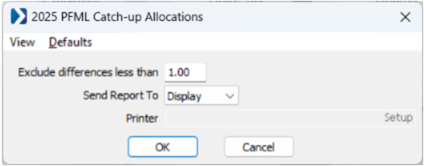
- Exclude differences less than: Use this field to set a minimum dollar amount for entries you want to review or correct. Any differences below the amount you enter will be excluded from the report. Rounding differences of $0.02 or less are always excluded.
Example: To exclude differences of less than $1.00, enter 1.00 (this is the default value) or leave this field blank to include all entries, regardless of amount. - Send Report To:
- Display (default): Using this option displays the erroneous entries and provides a link, giving you access to an automated process which can create the correcting journal entries.
- Printer: Using this option prints the report, which allows you to review the erroneous entry details and the correcting entries, but correcting journal entries must be created manually.
- Clipboard: Using this option saves the report to your clipboard in a PDF format, which allows you to review the erroneous entry details and the correcting entries, but correcting journal entries must be created manually.
- Email: Using this option attaches the report in a PDF format to an email, which allows you to review the erroneous entry details and the correcting entries, but correcting journal entries must be created manually.
Interpreting the Report:
- No Entries to Correct: No erroneous entries were found. No action is needed.
- Page(s) showing entry details:
- G/L Period: The general ledger period that needs to be corrected
- Check Date: The date of the check that needs to be corrected
- Employees: The employee on the check
- Tax Type: The PFML program
- Wages: Wages paid
- Posted: The employer catchup that posted erroneously
- Correction: Amount to correct the erroneous posting
- Correction Distribution section:
- Account: The general ledger account number affected
- Debit: Debit entry needed
- Credit: Credit entry needed
- Cost Code: Job cost code affected
- Type: Job cost type affected
- Equipment: Equipment affected
- Code: Equipment code affected
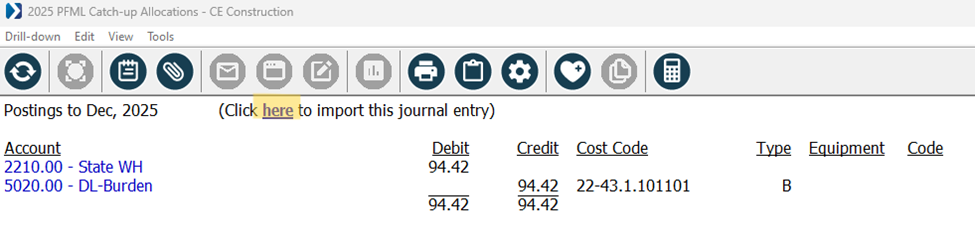
- Page(s) showing "Postings to [period], 2025":
- Click here to import this journal entry: Initiate the journal entry import process (steps below)
- Account: The general ledger account number and description affected
- Debit: Debit entry needed
- Credit: Credit entry needed
- Cost Code: Job cost code affected
- Type: Job cost type affected
- Equipment: Equipment affected
- Code: Equipment code affected
Steps to correct the erroneous general ledger and job postings: (Deltek Tracking Number: 2498670)
State Withholding Tax Table, Rate, and SUTA Wage Base Updates
The 2026 withholding tax tables and rates of the following states have been updated:
- Massachusetts: Updated the inflation-adjusted threshold for the surtax from $1,083,150 to $1,107,750.
- Washington: When running the payroll register, any portion of the required WA Cares employee contributions an employer pays is considered taxable to the employer using the Employer PFAML Pickup Fringe assigned in the State Tax Table Maintenance.
(Deltek Tracking Number: 2503787)
Software Issues Resolved
This section describes the software issues resolved in this release. Some descriptions might contain additional information, including ways on how to work around the defects.
Deltek Tracking Number: 25798301099 File Upload Error
When submitting electronic 1099s to the IRS Filing Information Returns Electronically (FIRE) system, the electronic 1099s failed to be uploaded whether they were submitted as original or replacement files.
Deltek Tracking Number: 2573115Connecticut PFML Catch-up Calculation Error
When processing a 2026 payroll, the CT PFML function incorrectly calculated 50% of catch-up as taxable regardless of the actual employer rate.
Deltek Tracking Number: 2579870Delaware W-2 Export Missing RW Record
When generating a W-2 export for Delaware, the export file did not contain the RW record.
Deltek Tracking Number: 2561765Long Time Entry Descriptions Crashes the Application
When creating a time entry with 260 or more characters in the description and opening this time entry in the Time Center with the Description column displayed, the application crashed without an error message or crash log.
Deltek Tracking Number: 2573076Minnesota PFML Catch-up Calculation Error
When processing a 2026 payroll, the MN PFML function incorrectly calculated the employer's non-taxable portion as the taxable catch-up amount.
Deltek Tracking Number: 2573058Washington PFML Catch-up Calculation Error
When processing a 2026 payroll, the WA PFML function incorrectly calculated which portion of the catch-up should be taxable to the employee.
Summary of Changes
New Features and Enhancements
The following is a list of new features and enhancements for this release:- Payroll System
- Quarterly Elections for PFML and PFML Exception Report
- State Withholding Tax Table, Rate, and SUTA Wage Base Updates
- Tax Form Updates
- Electronic Filing Updates
- Washington Paid Family and Medical Leave (PFAML) Updates
- Updates Requiring Manual Intervention
- One Big Beautiful Bill Act (OBBB) No Tax on Tips Compliance
- Minnesota Paid Leave (PFML) Updates
Software Issues Resolved
The following is a list of software issues resolved for this release:
- Job Costing System
- Committed Cost Report Performance
- Payroll System
- Fringe Error When Running a Payroll
- Incorrect Application of Catch-up on Checks
- Massachusetts PFML Tax on Payroll with Non-Tax Pay Only
- MasterTax RTS Export Uses Incorrect SUTA Option
- WA Cares Incorrectly Applies Wage Cap
New Features and Enhancements
This section describes the new features and enhancements included in this release.
Quarterly Elections for PFML and PFML Exception Report
For years 2025 and 2026 onwards, quarterly elections for PFML have been enabled for the following states:
- Connecticut
- Massachusetts
- New York
To assist employers, a new PFML Exception Report was added in version 25.3.2 for Connecticut, Massachusetts, and New York. This report helps identify employees whose quarterly PFML participation settings may not align with calculated contributions for 2025.
Required Action
If you have employees participating in PFML programs for CT, MA, and/or NY, you should run this report before filing PFML.
Navigation
Payroll System > Reports > Tax Reporting > State Paid Family Leave Report > CT, MA, NY PFML Exception Report
Note: For any exceptions found, you should consult your tax advisor to determine if any amended returns are needed for any quarters.
Interpreting the Report
- No Exceptions Found
All employee participation settings align correctly. You may move to step 3 below. - Participant = Yes / Contributions = No (one or more quarters)
The employee is marked as participating, but no contributions were calculated. - If the employee was participating in the quarter(s), move to step 3 below.
- Note: You should consult your tax advisor to determine if any amended returns are needed for previous quarters.
- If the employee was not participating in the quarter(s), the setting is incorrect and you should follow Steps to correct PFML Participation below.
- Note: You should consult your tax advisor to determine if any amended returns are needed for previous quarters.
- Participant = No / Contributions = Yes (one or more quarters)
The employee is marked as not participating, but contributions were calculated. - If the employee was participating in the quarter(s), the setting is incorrect and you should follow Steps to correct PFML Participation below.
- Note: You should consult your tax advisor to determine if any amended returns are needed for previous quarters.
- If the employee was not participating in the quarter(s), move to step 3 below.
- Note: You should consult your tax advisor to determine if any amended returns are needed for previous quarters.
Steps to Correct the PFML Participation Setting
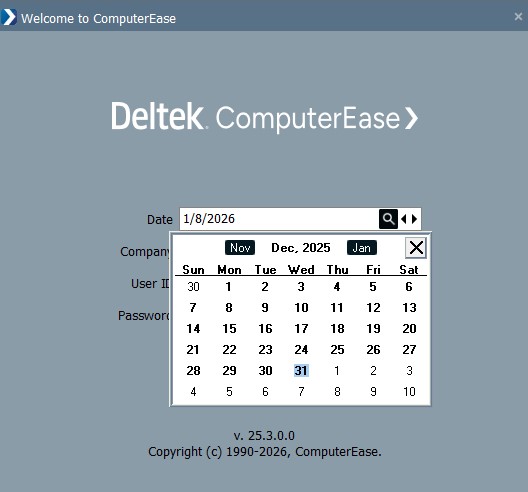
- At the ComputerEase log-in screen, change the Date to 12/31/25 using any of these methods:
- Use the lookup icon on the Date field to expose the calendar (shown below), then click December and click 31 on the calendar to set the date.
- Use the back arrow on the Date field to scroll back to 12/31/2025 to set the date.
- Type 12/31/2025 in the date field manually to set the date.
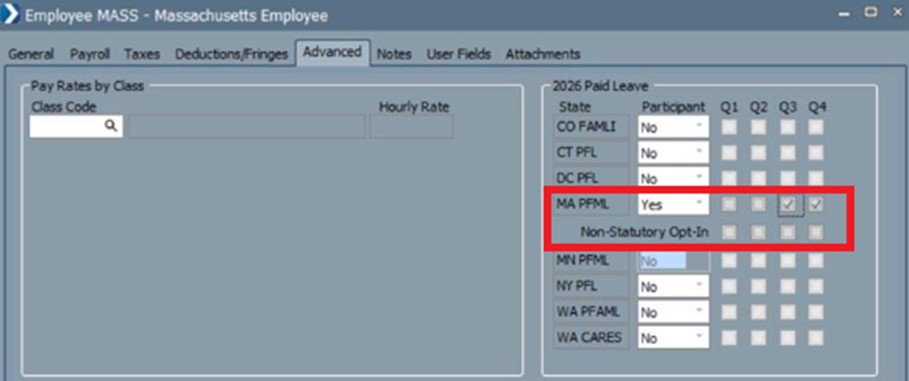
- Through Employee Maintenance, check or uncheck participation for each quarter to reflect what their participation actually was. Example below.
- Run the PFML Report for CT, MA, or NY, then complete tax filing using your standard process.
(Deltek Tracking Number: 2560795)
State Withholding Tax Table, Rate, and SUTA Wage Base Updates
The 2026 withholding tax tables and rates of the following states have been updated:
- Illinois: Updated the state allowance from $2,850 to $2,925.
- Louisiana: Updated the standard deduction to the following:
- Single: from $12,500 to $12,875.
- Married: from $25,000 to $25,750.
- Michigan: Updated the state allowance from $5,800 to $5,900.
- New Jersey:
- Updated the Disability Insurance (DI) employee rate from 0.23 to 0.19.
- Updated the Family Leave Insurance (FLI) employee rate from 0.33 to 0.23.
- North Dakota: Updated the tax brackets used in the percentage method with 2.5% as the highest rate.
- Oregon:
- Updated the federal tax adjustment from $8,500 to $8,750.
- Updated the state allowance from $256 to $263.
- Updated the phase out values used in the tables.
- Updated the standard deduction to the following:
- Single: from $2,835 to $2,910.
- Married: from $5,670 to $5,820.
- Updated the tax brackets used in the percentage method with 9.9% as the highest rate.
Tax Form Updates
Multiple IRS tax forms have been updated for 2025. These include the file format, ACA transmitter ID, printing, and exporting of the following forms:
Electronic Filing Updates
The Electronic W-2 Filing specifications of the following states have been updated:
- Alabama: Exempt overtime wages are now reported on Box 14 as "AL EX OT $" and the amount.
- Maine: PFML contributions are now reported on Box 14 as "MEPFML".
For the Unemployment Electronic File Creation for Michigan in the 4th Quarter of 2025 and forward, the Michigan File Format field has been added with the following options:
- MIWAM: Generate the file in the format utilized prior to the new ICESA format.
- MiUI: Generate the file in the new ICESA format.
Washington Paid Family and Medical Leave (PFAML) Updates
In the Payroll System > Maintenance Programs > Tax Rate Maintenance > State Tax Table Maintenance for Washington for year 2026, the following changes have been made:
- Updated the Total PFAML Rate to allow up to four decimal places.
- During upgrade from a version prior to 25.3, if Enable Paid Family and Medical Leave is set to Yes (Employee Only) and the PFAML Employee Contribution is not 100%:
- Replace the Total PFAML Rate with the previous Total PFAML Rate * PFAML Employee Contribution, rounded to four decimal places.
- Set the PFAML Employee Contribution to 100%
- Updated the displayed rate examples.
Updates Requiring Manual Intervention
Effective January 1, 2026, the Ohio withholding rate on bonus income and supplemental compensation income will be updated from 3.5% to 2.75%. This change should be manually applied through Payroll System > Maintenance Programs > Tax Rate Maintenance > State Tax Table Maintenance for Ohio.
(Deltek Tracking Number: 2476105)
One Big Beautiful Bill Act (OBBB) No Tax on Tips Compliance
ComputerEase has been updated to identify employees who qualify for occupation codes that are recognized by the IRS for no tax on tips. The following are the changes made:
- On the Payroll System > Maintenance Programs > Employee Maintenance > Payroll tab, the TTOC field has been added. This is an optional field that enables you to assign an employee with an occupation code that is recognized by the IRS for no tax on tips.
- In the Payroll System > Maintenance Programs > Employee Maintenance > File > Import Employees dialog box, TTOC can now be imported.
- In the Payroll System > Reports > Employee Master Report, the EEOC Level and TTOC fields have been included.
- In the Qtool > Payroll > Employee Master Report, TTOC has been added as an available column.
(Deltek Tracking Number: 2506030)
Minnesota Paid Leave (PFML) Updates
In the Payroll System > Maintenance Programs > Tax Rate Maintenance > State Tax Table Maintenance for Minnesota for year 2026, the following changes have been made:
- Updated the Enable Minnesota PFML options to:
- Yes - Large Employer: Previously Yes. Large employers must contribute between 50% and 100%.
- Yes - Small Employer: Small employers must contribute between 33.33% and 100%.
- No
- Employer Paid Leave Pickup Fringe is required if Enable Minnesota PFML is set to:
- Yes - Large Employer and the employer portion is above 50%.
- Yes - Small Employer and the employer portion is above 33.33%.
- Updated the displayed rate examples.
(Deltek Tracking Number: 2562134)
Software Issues Resolved
This section describes the software issues resolved in this release. Some descriptions might contain additional information, including ways on how to work around the defects.
Deltek Tracking Number: 2542226Committed Cost Report Performance
When running the Job Costing System > Reports > Committed Cost Report with the option set to Open POs, it took significantly longer. This also occurred when excluding POs from the Cost Types in the Job Center.
Deltek Tracking Number: 2562335Fringe Error When Running a Payroll
When running a payroll with WA PFAML enabled, an error was encountered for a few employees stating that the Employer PFAML Pickup Fringe was not enabled for the payroll.
Deltek Tracking Number: 2562693Incorrect Application of Catch-up on Checks
When running a payroll as a PFML non-participant for a quarter, then turning on participation for the next quarter, a catch-up of the previous quarter's payroll is performed.
Deltek Tracking Number: 2560197Massachusetts PFML Tax on Payroll with Non-Tax Pay Only
When running a payroll with non-taxable pay only, tax for MA PFML was calculated.
Deltek Tracking Number: 2418044MasterTax RTS Export Uses Incorrect SUTA Option
When running a MasterTax RTS export, the SUTA option used was the one from the previous quarter instead of the SUTA option from the current quarter.
Deltek Tracking Number: 2569603WA Cares Incorrectly Applies Wage Cap
When running a payroll for a WA employee with wages exceeding the FICA limit ($176,000) and participating in WA Cares, a wage cap was implemented in the tax calculation which resulted in a negative catch-up.
Summary of Changes
New Features and Enhancements
The following is a list of new features and enhancements for this release:- Payroll System
- Federal Tax Information Updates
- State Withholding Tax Table, Rate, and SUTA Wage Base Updates
- Updates Requiring Manual Intervention
- Year-End Electronic Filing Updates
- Ohio Local Tax Updates to Include RITA Field
- Qtool
- Job Detail Report Updates
Software Issues Resolved
The following is a list of software issues resolved for this release:
- Payroll System
- Error Message Incorrectly Generated on Payroll Grid Entry
New Features and Enhancements
This section describes the new features and enhancements included in this release.
Federal Tax Information Updates
The following federal tax rates have been made for the year 2026:
- Updated the FICA Wage Limit from $176,100 to $184,500.
- Updated the tax brackets used in the percentage method with 37% as the highest rate.
- Updated the nonresident aliens' wage adjustment to the following:
- If employee was first paid wages before 2020 and has not submitted a Form W-4 for 2020 or later: from $10,700 to $11,800.
- If employee was first paid wages in 2020 or later, or has already submitted a Form W-4 for 2020 or later: from $15,000 to $16,100.
State Withholding Tax Table, Rate, and SUTA Wage Base Updates
The 2026 withholding tax tables and rates of the following states have been updated:
- Arkansas:
- Updated the standard deduction from $2,410 to $2,470.
- Updated the tax brackets used in the percentage method with 3.9% as the highest rate.
- California:
- Updated the SDI rate from 1.2% to 1.3%.
- Updated the state allowance from $163.90 to $168.30.
- Updated the low-income exemption threshold to the following:
- Single/Dual Income: from $18,368 to $18,896.
- Married 2+ Allowance/Head of Household: from $36,736 to $37,791.
- Updated the standard deduction to the following:
- Single/Dual Income: from $5,540 to $5,706.
- Married 2+ Allowance/Head of Household: from $11,080 to $11,412.
- Updated the tax rate tables used in the exact calculation method.
- Colorado: Updated the standard deduction to the following:
- Married filing jointly or qualifying surviving spouse: from $10,000 to $11,000.
- Other: from $5,000 to $5,500.
- Hawaii: Updated the standard deduction from $1,650 to $4,350.
- Iowa: Updated the standard deduction to the following:
- Other: from $12,000 to $13,000.
- Head of Household: from $18,050 to $19,500.
- Married filing jointly with Spouse Income: from $12,000 to $13,000.
- Married filing jointly no Spouse Income: from $24,050 to $26,000.
- Idaho: Updated the tax rate from 3% to 2.95%.
- Kentucky:
- Updated the tax rate from 4% to 3.5%.
- Updated the standard deduction from $3,270 to $3,360.
- Maine:
- Updated the state allowance from $5,150 to $5,300.
- Updated the standard deduction to the following:
- Single: from $12,150 to $12,450.
- Married: from $27,150 to $27,750.
- Updated the standard deduction formula for single employees who earn more than $102,250 or for married employees who earn more than $204,550. The deduction reaches zero when a single employee earns at least $177,250 or when a married employee earns at least $354,550.
- Updated the tax brackets used in the percentage method with 7.15% as the highest rate.
- Minnesota:
- Updated the state allowance from $5,200 to $5,300.
- Updated the tax brackets used in the percentage method with 9.85% as the highest rate.
- Mississippi: Updated the tax rate from 4.4% to 4%.
- Missouri:
- Updated the standard deduction to the following:
- Single: from $15,000 to $16,100.
- Married: from $30,000 to $32,200.
- Married 2 Earners: from $15,000 to $16,100.
- Head of Family: from $22,500 to $24,150.
- Updated the tax brackets used in the percentage method with 4.7% as the highest rate.
- Montana: Updated the tax brackets used in the percentage method with 5.65% as the highest rate.
- Nebraska:
- Updated the state allowance from $2,360 to $2,440.
- Updated the flat supplemental tax rate from 5% to 3.5%.
- Updated the tax brackets used in the percentage method with 4.6% as the highest rate.
- New Mexico: Updated the tax brackets used in the percentage method with 5.9% as the highest rate.
- New York:
- Updated the example employee contribution rate for Paid Family Leave from 0.388% to 0.432%.
- Updated the example annual contribution from $354.53 to $411.91.
- Updated the tax rate tables used in the exact calculation method.
- North Carolina: Updated the tax rate from 4.35% to 4.09%.
- Oklahoma:
- Updated the tax brackets used from six to four.
- Updated the tax brackets used in the percentage method with 4.5% as the highest rate.
- Oregon: Updated the workers' benefit fund (WBF) rate from 0.02 to 0.018.
- Rhode Island:
- Updated the TDI wage base from $89,200 to $100,000.
- Updated the TDI employee rate from 1.3% to 1.1%.
- Updated the wage threshold where the value of the allowance becomes zero from $283,250 to $290,800.
- Updated the tax brackets used in the percentage method with 5.99% as the highest rate.
- South Carolina:
- Updated the state allowance from $4,860 to $5,000.
- Updated the standard deduction from $7,300 to $7,500.
- Updated the tax brackets used in the percentage method with 6% as the highest rate.
- Vermont:
- Updated the state allowance from $5,300 to $5,400.
- Updated the tax brackets used in the percentage method with 8.75% as the highest rate.
The 2026 SUTA wage base of the following states have been updated:
- Alaska: Updated from $51,700 to $54,200.
- Connecticut: Updated from $26,100 to $27,000.
- Hawaii: Updated from $62,000 to $64,500.
- Idaho: Updated from $ 55,300 to $58,300.
- Kansas: Updated from $14,000 to $15,100.
- Kentucky: Updated from $11,700 to $12,000.
- Louisiana: Updated from $7,700 to $7,000.
- Minnesota:
- Updated from $43,000 to $44,000.
- Updated the additional assessment from 5% to 14%.
- Missouri: Updated from $9,500 to $9,000.
- Montana: Updated from $45,100 to $47,300.
- New Mexico: Update from $33,200 to $34,800.
- New York:
- Updated from $12,800 to $17,600.
- Updated the reemployment wage limit from $12,800 to $17,600.
- North Carolina: Updated from $32,600 to $34,200.
- North Dakota: Updated from $45,100 to $46,600.
- Oklahoma: Updated from $28,200 to $25,000.
- Oregon: Updated from $54,300 to $56,700.
- Rhode Island:
- Updated from $29,800 to $30,800.
- If "Highest Tax Rate" is selected, the default value is changed from $31,300 to $32,300.
- Utah: Updated from $48,900 to $50,700.
- Vermont: Updated from $14,800 to $15,400.
You can view the withholding tax tables, rates, and default SUTA wage base of a state on the 2026 State Tax Settings window (Payroll System > Maintenance Programs > Tax Rate Maintenance > State Tax Table Maintenance). Applying the new 2026 Tax Tables can be performed by updating the tables when prompted while running your first 2026 payroll checks.
Updates Requiring Manual Intervention
The 401(k) and IRA retirement plan limits have been updated for the year 2026. These limits need to be manually updated to be compliant with the IRS guidelines.
- The contribution limit for plans under Sections 401(k), 403(b), and 457 is updated from $23,500 to $24,500.
- The annual compensation limit for qualified plans is updated from $350,000 to $360,000.
- The catch-up contribution limit for employees age 50 or over for 401(k), 403(b), and 457 is updated from $7,500 to $8,000.
- The Roth catch-up wage threshold for 2025 is updated from $145,000 to $150,000.
To update the annual limits, do one of the following:
- If you are utilizing common rates, select Payroll System > Maintenance Programs > Deduction Maintenance > Common Rates tab.
- If you are not utilizing common rates, select Payroll System > Maintenance Programs > Edit Deduction/Fringe Rate for all Employees.
(Deltek Tracking Number: 2153269)
Year-End Electronic Filing Updates
The following items are no longer restricted for tax year 2025 and updated with the latest forms, if applicable:
- Electronic file creation of 1099s
- Electronic file creation of W-2
- Print 1096
- Print 1099s
- Print W-2s
- Print W-3
- Upload W-2s to Employee Hub
- Export print service
For Prepare W-2s, the Include calculated OBBB (One Big Beautiful Bill) Exempt OT on W-2 option has been added. If selected, the OBBB Overtime Premium Exempt report is run and the value is included in W-2 Box 14. If not selected, the W-2 will not populate the OBBB Exempt OT value on the W-2.
For Payroll Service users, when running Quarter End Reports, if the period selected is December 2025 and it is set to be sent to Deltek Payroll Services, the Include OBBB OT on W-2 option is displayed. If selected, Prepare W-2s will run the OBBB Overtime Premium Exempt report and the value is populated in W-2 Box 14. If not selected, the W-2 will not populate the OBBB Exempt OT value on the W-2.
The OBBB also included the option to report qualified tips on W-2s in Box 14 for tax year 2025 and require it in Box 12 for tax year 2026. We have added a Fringe Type Box 12 (TP) Qualified Tips that is designed for use when generating W-2's for tax year 2026. If you want to report qualified tips value on your 2025 W-2's, you can create a fringe of this type through Fringe Maintenance, and in the W-2 Box 14 Code field, assign the TP code so that it will appear on the W-2. Refer to your CPA for further guidance.
For Kentucky W-2 electronic filing starting tax year 2025, the state employer account number must only contain either six or nine digits. An error message is displayed if this specification is not met.
(Deltek Tracking Number: 2553636)
Ohio Local Tax Updates to Include RITA Field
The OH RITA Code field has been added to the Local Tax Table Maintenance for Ohio. This allows you to designate a RITA code on your Ohio Locals so that you can properly generate a RITA compliant W-2 file. The field provides a list of RITA Municipality Codes and Names.
To generate a RITA compliant file to submit to RITA, during W-2 Electronic File Creation > State Info for Ohio, you can specify if you are generating for RITA filing with the following options:
- State Format: For filing with the State of Ohio
- RITA Format: For filing with RITA. Selecting this option will use the following information in the RS record:
- RITA Taxing Entity Code: If local has a RITA code assigned, this is populated with R+Municipality Code (e.g., R0425). If local is not RITA, this is populated with 00000.
- Supplemental Data 1: Municipality name for which tax was withheld or required.
- Supplemental Data 2: State name for which tax was withheld or required.
(Deltek Tracking Number: 2363020)
Job Detail Report Updates
The following updates have been made to the Job Detail Report at Qtool:
- Added Contract Amount as an available column. It displays with the appropriate Cost Code Level, Job, Phase, or Category.
- Populated the Units and Units Budget columns when they have values in the record.
To run the report, select Qtool > Job Cost > Job Cost Detail.
(Deltek Tracking Number: 2543037)
Software Issues Resolved
This section describes the software issues resolved in this release. Some descriptions might contain additional information, including ways on how to work around the defects.
Deltek Tracking Number: 2559188Error Message Incorrectly Generated on Payroll Grid Entry
When entering multiple employees' hours in the payroll Grid Entry dialog box, the error "FLSA requires employer to maintain hours worked each day by week for non-exempt employees" was incorrectly generated based on total hours for the day instead of hours per employee.
Summary of Changes
New Features and Enhancements
The following is a list of new features and enhancements for this release:- Payroll System
- Deduction and Fringe Maintenance Updates
- One Big Beautiful Bill Act (OBBB) Exempt Overtime Updates
- One Big Beautiful Bill Act (OBBB) Overtime Premium Reporting Updates
- Tax Reporting Updates for Employer-Paid State PFML Contributions
- Colorado Family Leave Report Update
- Massachusetts Paid Leave (PFML) Updates
- Michigan Electronic Filing Updates
- Minnesota Paid Leave (PFML) Updates
- New Jersey 4th Quarter Rates Rollover
- Electronic Filing Restriction
- Year-End Tax Updates
Software Issues Resolved
The following is a list of software issues resolved for this release:- Accounts Payable
- Cash Fringe Incorrectly Reduces Local Taxable Wages
- General
- Large XML Files Cause Crashing
- Payroll System
- Edited Subcontract Invoice Date Not Reflected in Job Detail Report
- Union Fringe Rate Limit Setting Not Working
- Shop Clock
- Time Entry Monitor Option Not Initialized
New Features and Enhancements
This section describes the new features and enhancements included in this release.
Deduction and Fringe Maintenance Updates
The Unlock Tax Settings button has been added to the Deduction and Fringe Maintenance dialog boxes. This button enables you to request a temporary override of locked tax settings so you can make corrections without creating new deductions or fringes.
When you click Unlock Tax Settings, a message prompts you to contact Customer Support and provide them with a system-generated code. Customer Support will then give you a return code that you can enter to unlock and edit all tax settings.
In addition, you can now change the Workers Comp Taxable and General Liability Taxable settings on all deductions and fringes after use if you are a non–Payroll Service user or a Payroll Service ComputerEase Admin. Note that editing a tax setting may affect prior reporting.
(Deltek Tracking Number: 2346434)
One Big Beautiful Bill Act (OBBB) Exempt Overtime Updates
ComputerEase has been updated to accommodate OBBB reporting of Fair Labor Standards Act (FLSA) exempt qualified overtime premiums. Changes have been made to various parts of ComputerEase to support this feature.
Under Payroll System > Maintenance Programs > Employee Maintenance > Payroll tab:
- Updated the Employee Type options to the following:
- Changed Salaried to Salaried-Exempt.
- Salaried-Exempt does not require time to be entered by day, by week.
- Added Salaried-Non-Exempt.
- Salaried-Non-Exempt requires time to be entered by day, by week.
- Salaried O/T Rate is disabled if the Employee Type selected is Salaried Non-Exempt.
- Other and Bonus Pay for Salaried-Non-Exempt employees will always require a date.
Under Payroll System > Maintenance Programs > Employee Maintenance > File > Import Employees:
- Enabled Salaried-Exempt and Salaried-Non-Exempt payroll types to be imported.
Under Payroll System > Maintenance Programs > Month to Date Maintenance > Federal tab:
- Added OBBB Premium Exempt OT Starting Balance for 2026 onwards. This field is used to load the beginning balance only for users converting to ComputerEase. It is not updated by payroll runs. The final W-2 reportable balance will be calculated based on this beginning balance and actual payroll results at year-end.
Under Payroll System > Reports > Employee Master Report:
- Updated to include Salaried-Non-Exempt.
Under Qtool > Payroll > Employee Master Report:
- Updated the Type column to report on both Salaried-Exempt and Salaried-Non-Exempt as Salaried.
- Added the OT Exempt column where Y or N values are populated depending on the employee type:
- Y: Salaried-Exempt
- N: Full Time, Part Time, and Salaried-Non-Exempt
- Renamed Date/Time required for Nonsalaried to Date/Time required for Non-Exempt employees.
- Removed the No option for this field.
- Existing users with the No option selected will have this field set to the default value of Date Only upon the installation of ComputerEase 25.3.
FLSA requires employers to maintain hours worked each day by week for non-exempt employees (Part Time, Full Time, and Salaried-Non-Exempt). This error message is displayed when creating a time entry with more than 24 hours or with no work date. Areas of ComputerEase that now display this error message when creating time entries are as follows:
- Payroll System > Time Center
- Payroll System > Enter Labor Distribution by Employee
- Payroll System > Enter Labor Distribution by Job
- Payroll System > Enter Non-Job Hours
- Payroll System > Print Payroll Register
A similar error message is displayed when importing time from a file into labor distribution and when importing entries from FieldEase.
(Deltek Tracking Number: 2494574)
One Big Beautiful Bill Act (OBBB) Overtime Premium Reporting Updates
The OBBB Overtime Premium Exempt Report has been added. This new report determines the premium portion of Fair Labor Standards Act (FLSA) qualified overtime for employees so that they can claim the overtime premium on their tax returns. According to the FLSA, it excludes sick, vacation, and holiday hours. You can specify an employee range and select whether to exclude weeks with no overtime or double time. The report can be generated with one employee per page, allowing you to easily provide it to employees.
The report has the following formats:
- Detail: This is the default format. It provides weekly details and supports page breaks per employee.
- Summary: This shows employee totals only and excludes weekly details with drill-down capability per employee.
The report displays the following:
- Employee details
- Week ending dates
- Hours worked details
- FLSA qualified details
- Weekly and employee-level totals
Employees with no overtime or double time for checks dated in 2025 are excluded. Additionally, weeks prior to the earliest check period are not reported to prevent backdated corrections.
To run the report, select Payroll System > Reports > Tax Reporting > OBBB Overtime Premium Exempt.
Security access to the report in PW MAINT follows Programs > Payroll > Reports > Ledger Cards in the User Settings dialog box.
The Prepare W-2s dialog box now calculates and collects the Premium Hours Over 40 FLSA Qualified Exempt Amount as reported on the OBBB Overtime Premium Exempt report. For employees with a non-zero amount, the W-2 includes this value in Box 14 as "OBBB OT". The Edit W-2s dialog box also supports manual entry or editing of the Box 14 "OBBB OT" value.
(Deltek Tracking Number: 2446562)
Tax Reporting Updates for Employer-Paid State PFML Contributions
If you currently have any Paid Leave programs enabled, we highly recommend reviewing each of them prior to running your first 2026 payroll.
Starting January 1, 2026, any portion of an employee's state-mandated paid leave contribution that is paid by the employer is treated as additional wages. These amounts are subject to federal and state income tax, as well as applicable employment taxes, including Social Security and Medicare. Report these amounts in Boxes 1, 3, and 5 of Form W-2.
In the State Tax Table Maintenance of participating states for Tax Year 2026, the Employer Paid Leave Pickup Fringe field has been added. Depending on the state, the field may display FAMLI, PFAML, PFL, PFML, or PFMLI instead of Paid Leave.
If an employer is picking up any portion of the employees' minimum paid leave contribution, this field is required. You need to create at least one fringe for this employer pickup. If you are working in multiple states, we recommend creating a fringe for each state.
If you are in Maine or Massachusetts, you need to reenable your paid leave settings by electing the employee count option for your organization before running your first 2026 payroll.
Each participating state has its specific requirements for this field:
- Colorado: Required if Enable Family and Medical Leave Ins. is set to:
- Yes (less than 10 employees) and the employer portion is above 0%.
- Yes (10 or more employees) and the employer portion is above 0.44%.
- Connecticut: Required if the employer portion is above 0%.
- Delaware: Required if the employer portion is above 50%.
- Maine: Required if Enable Maine PFML is set to:
- Yes (less than 15 employees) and the employer portion is above 0%.
- Yes (15 or more employees) and the employer portion is above 50%.
- Massachusetts: Required if Enable Paid Family and Medical Leave is set to:
- Yes (less than 25 employees) and the employer portion for either family or medical is above 0%.
- Yes (25 or more employees) and the employer family portion is above 0% or the employer medical portion is above 0.42%.
- New York: Required if the employer portion is above 0%.
- Oregon: Required if Enable Paid Leave Oregon is set to:
- Yes (less than 25 employees) and the employer portion is above 0%.
- Yes (25 or more employees) and the employer portion is above 40%.
- Washington: Required if Enable Paid Family and Medical Leave is set to:
- Yes (less than 50 employees) and the employer portion is above 0%.
- Yes (more than 50 employees) and the employer portion is above 28.57%
When you run the Payroll Register for checks dated on or after January 1, 2026, and any portion of an employee’s PFML contribution is paid or picked up by the employer, the Employer PFML Pickup Fringe in the applicable State Tax Table Maintenance includes the employer pickup amount (the amount above the minimum required employee contribution). The employer pickup amount can include:
- Employer pickups configured in the State Tax Table Maintenance
- Adjustments made through catch-up for missed deductions
- Adjustments made due to tax overrides
If the employer pays a portion of the employees' paid leave contribution, you must create a fringe for proper tax reporting. An error occurs if the Employer Paid Leave Pickup Fringe is blank in the State Tax Table Maintenance and an employer pickup is identified when running the Payroll Register. A fringe must be assigned in State Tax Table Maintenance to continue.
The Colorado Tax Table Maintenance has additional updates to support this feature:
- Updated the Enable Paid Family and Medical Leave Ins. options to:
- Yes (less than 10 employees): Previously Yes (Employee Only)
- Yes (10 or more employees): Previously Yes (Employee and Employer)
- No
- During upgrade, if Enable Paid Family and Medical Leave Ins. is set to Yes (less than 10 employees) and if the Employee Rate is less than or equal to 0.45, Employer Rate is equal to 0.45 - Employee Rate.
- Updated the displayed rate examples.
The Maine Tax Table Maintenance has additional updates starting 2026 to support this feature:
- Updated the Enable Maine PFML options to:
- Yes (less than 15 employees)
- Yes (15 or more employees)
- No
- During upgrade, the value for Enable Maine PFML is set to blank and needs to be reenabled before running your first 2026 payroll.
The Massachusetts Tax Table Maintenance has additional updates starting 2026 to support this feature:
- Updated the Enable Paid Family and Medical Leave options to:
- Yes (less than 25 employees)
- Yes (25 or more employees)
- No
- Expanded the Employer and Employee Rate fields to:
- Employer Medical
- Employer Family
- Employee Medical
- Employee Family
- The initial values for the expanded contribution fields are set to 0.00.
- Updated the displayed rate examples.
- During upgrade, the value for Enable Paid Family and Medical Leave is set to blank and needs to be reenabled before running your first 2026 payroll.
The Oregon Tax Table Maintenance has additional updates to support this feature:
- Updated the Enable Paid Leave Oregon options to:
- Yes (less than 25 employees): Previously Yes (Employee Only)
- Yes (25 or more employees): Previously Yes (Employee and Employer)
- No
- During upgrade, if Enable Paid Leave Oregon is set to Yes (less than 25 employees):
- If the Employee Rate is less than or equal to 0.6, Employer Rate is equal to 0.6 - Employee Rate.
- If the Employee Rate is greater than 0.6, Employer Rate is equal to 0.00.
- Adjusted the Earnings Limit field to accept whole numbers starting 2023.
- Removed the Earnings Limit field starting 2024.
- Updated the displayed rate examples.
The Washington Tax Table Maintenance has additional updates to support this feature:
- Updated the Enable Paid Family and Medical Leave options to:
- Yes (less than 50 employees): Previously Yes (Employee Only)
- Yes (50 or more employees): Previously Yes (Full)
- No
- During upgrade, if Enable Paid Family and Medical Leave is set to Yes (less than 50 employees) and the PFAML Employee Contribution is not 100%:
- Replace the Total PFAML Rate with the previous Total PFAML Rate * PFAML Employee Contribution.
- Set the PFAML Employee Contribution to 100%
- Added the PFAML Employer Contribution field. This is read-only and it is calculated as 100 - PFAML Employee Contribution.
- Updated the displayed rate examples.
(Deltek Tracking Number: 2420249)
Colorado Family Leave Report Update
You can now select either a specific quarter or month for reporting data. Quarters are listed first, followed by months. The report title or heading reflects the selected reporting criteria to help users quickly identify the report type.
(Deltek Tracking Number: 2000511)
Massachusetts Paid Leave (PFML) Updates
You can now specify whether non-statutory employees have opted in to Massachusetts PFML by choice. The Non-Statutory Opt-In options are available for each quarter in which the employee participates in Massachusetts PFML. The MA Family Leave Report has also been updated to include the Non-Statutory Opt-In column.
To update an employee's settings, select Payroll System > Maintenance Programs > Employee Maintenance > Advanced tab.
(Deltek Tracking Number: 2010435)
Michigan Electronic Filing Updates
The Unemployment Insurance Agency (UIA) is transitioning to a new system called MiUI, which will replace the Michigan Web Account Manager (MiWAM). ComputerEase has been updated to support a file format accepted by MiUI.
Starting December 15, 2025, all Quarterly Wage Reports, both past due and future filings, must be submitted through MiUI. Reports can be submitted beginning the first day of each quarter and are due by the following dates: - January 25
- April 25
- July 25
- October 25
Each due date corresponds to the previous quarter.
(Deltek Tracking Number: 2440844)
Minnesota Paid Leave (PFML) Updates
ComputerEase has been updated to accommodate the new Minnesota Paid Leave program (PFML) which begins on January 1, 2026. If you process Minnesota wages, you will need to establish your participation and elected contribution amounts prior to running your first 2026 payroll.
In the Payroll System > Maintenance Programs > Tax Rate Maintenance > State Tax Table Maintenance for Minnesota for year 2026, the following fields have been added:
- Enable Minnesota PFML: Default value is blank. You will need to assign a Yes or No value before processing your first 2026 payroll. If you are utilizing a private plan for either family or medical, select Yes and enter a rate of .00 in the portion the private plan covers. If you are utilizing a private plan for both family and medical, select No.
- Medical Leave
- Family Leave
- Total PFML Rate: Total of Medical and Family Leave.
- PFML Employer Contribution: Value entered must be greater than or equal to 50%.
- PFML Fringe: This field is required if the PFML Employer Contribution is greater than 50%. If employer is paying a portion of the Minnesota PFML, a fringe must be created for proper tax reporting.
- PFML Employee Contribution: Calculated as 100% less PFML Employer Contribution.
When you enable Minnesota PFML, employee participation is enabled for all quarters that the employee participates in Minnesota SUTA.
On the Payroll System > Maintenance Program > Employee Maintenance > Advanced tab for Minnesota, participation in Minnesota PFML follows Minnesota SUTA participation.
For users onboarding to ComputerEase after January 1, 2026, on the Payroll System > Maintenance Programs > MTD Maintenance > State tab for an employee with Minnesota taxes and earnings, the following fields have been added:
- Family Leave Withheld
- Family Leave Employer Portion
- Medical Leave Withheld
- Medical Leave Employer Portion
Minnesota PFML contributions have been added to the following:
- Payroll Center
- Payroll Expense and Quarterly Payroll reports generated for Payroll Services
- State Taxes Withheld reports
The MN Family Leave Report presents information related to the Minnesota PFML program. It can be generated from Payroll System > Reports > Tax Reporting > State Paid Family Leave Reports > MN Family Leave Report. The report output is by quarter and contains the following details:
- Employee details
- Minnesota PFML wages
- Total PFML percentage
- Total withheld for employee and employer
- Status
- Totals of all columns
In the Payroll System > Enter Labor Distribution by Employee > Tax Override dialog box for the State Tax of Minnesota, the MN Withheld fields have been added. The value entered overrides the employees' withholding when the Payroll Register performs calculations.
(Deltek Tracking Number: 2071517)
New Jersey 4th Quarter Rates Rollover
When tax rates span calendar years, such as the 3rd and 4th quarters of the current year and the 1st and 2nd quarters of the following year, the 4th quarter rates automatically roll over into the next year.
The SUI 4th quarter rate populates in:
- SUI 1st Qtr
- SUI 2nd Qtr
- SUI 3rd Qtr
- SUI 4th Qtr
The DI 3rd and 4th quarter rate populates in:
- DI 1st and 2nd Qtr
- DI 3rd and 4th Qtr
The WD 3rd and 4th quarter rate populates in:
- WD 1st and 2nd Qtr
- WD 3rd and 4th Qtr
If you do not manually update the rates before the rollover, the most recent rates are retained and applied.
(Deltek Tracking Number: 2195969)
Electronic Filing Restriction
Changes to the 2025 W-2 and 1099 programs will be in the upcoming 25.3.1 release by the end of December. To protect users from generating W-2s or 1099s prior to loading the necessary changes, we have limited various features. These options will be released in 25.3.1. An error message displays in these scenarios:
- Printing W-2s
- Printing the W-3
- Exporting W-2s
- Uploading W-2s
(Deltek Tracking Number: 2548794)
Year-End Tax Updates
The following state tax updates have been made for the year 2026:
- Colorado: The taxable wage limit was updated from $27,200 to $30,600. The FAMLI rate was updated from 0.9% to 0.88%.
- Delaware: The taxable wage limit was updated from $12,500 to $14,500.
- Iowa: The taxable wage limit was updated from $39,500 to $20,400.
- Illinois: The taxable wage limit was updated from $13,916 to $14,250.
- Nevada: The taxable wage limit was updated from $41,800 to $43,700.
- New Jersey: The taxable wage limit was updated from $43,300 to $44,800. The taxable wage limit for TDI and FLI was updated from $165,400 to $171,100.
- New York: The taxable wage limit was updated from $12,800 to $13,000.
- Oregon: The Total WBF Rate was updated from 0.02 to 0.018 per hour.
- Washington: The taxable wage limit was updated from $72,800 to $78,200.
- Wyoming: The taxable wage limit was updated from $32,400 to $33,800.
(Deltek Tracking Number: 1974031)
Software Issues Resolved
This section describes the software issues resolved in this release. Some descriptions might contain additional information, including ways on how to work around the defects.
Deltek Tracking Number: 2523020Edited Subcontract Invoice Date Not Reflected in Job Detail Report
When editing the date of a subcontract invoice, the change was not reflected in the Job Detail Report, and the system created zero postings for the new date while the original amount remained posted to the old date/period.
Deltek Tracking Number: 2503529Large XML Files Cause Crashing
When creating large XML files, the report could crash.
Deltek Tracking Number: 2502117Cash Fringe Incorrectly Reduces Local Taxable Wages
When setting a cash fringe to calculate on Gross Pay After Taxes with all taxable setting cleared, the system doubly reduced the local wages for resident locals.
Deltek Tracking Number: 2451257Union Fringe Rate Limit Setting Not Working
When setting up the maximum fringe hours limit in Union Rate Maintenance, the Hrs/Mon-All option did not take effect for multiple payroll checks posted in the same month.
Deltek Tracking Number: 2463312Time Entry Monitor Option Not Initialized
When setting up the Time Entry Monitor, the Continuously Refresh Display option did not initialize.
About Deltek
Better software means better projects. Deltek delivers software and information solutions that enable superior levels of project intelligence, management and collaboration. Our industry-focused expertise makes your projects successful and helps you achieve performance that maximizes productivity and revenue. www.deltek.com