
Fixing Duplicate Records
When Cobra detects duplicate records during login, it displays a dialog box that lists the affected file types and asks whether you want Cobra to fix the duplicates automatically.
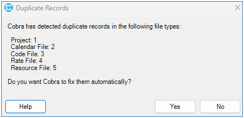
This topic explains what happens when you select Yes or No.
When You Click Yes
When you click Yes, Cobra identifies and renames duplicate records in the affected file types. Cobra displays its progress for each affected record type. After correcting all records, Cobra displays the Summary dialog box. The summary lists the changes made and can be copied to the clipboard.
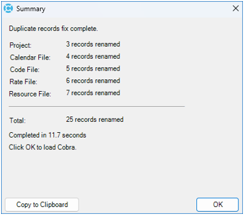
When you click OK, Cobra loads and displays the Cobra Explorer.
When Cobra encounters an error while renaming duplicate project records, it displays a message indicating that the error occurred and no changes were saved. Click OK to close the dialog box and exit Cobra.
How Cobra Renames Duplicate Records
When Cobra detects duplicate records, it retains one record with the original name and renames the remaining duplicates by appending a -DUP suffix and sequential number.
The affected file types can include:
- Projects
- Calendars
- Codes
- Rates
- Resources
For example:
| Original Records | Corrected Records |
|---|---|
| "Shuttle Work " | "Shuttle Work" |
| "Shuttle Work " | "Shuttle Work-DUP1" |
| "Shuttle Work " | "Shuttle Work-DUP2" |
If a record name is close to Cobra's default maximum length of 22 characters, Cobra truncates the name as needed to accommodate the -DUP suffix.
When You Click No
When you click No, Cobra displays a message that it cannot run while duplicate records exist, then exits.
How to...
Learn more about...