Application-Level Security
Application-level security pertains to menu items that are secured based solely on the user’s Primary Role in EPM Security Administrator or PPM Administrator. If a Primary Role is not defined for a user, Cobra uses the access rights defined for the DEFAULT role in EPM Security Administrator or PPM Administrator to secure a menu item.
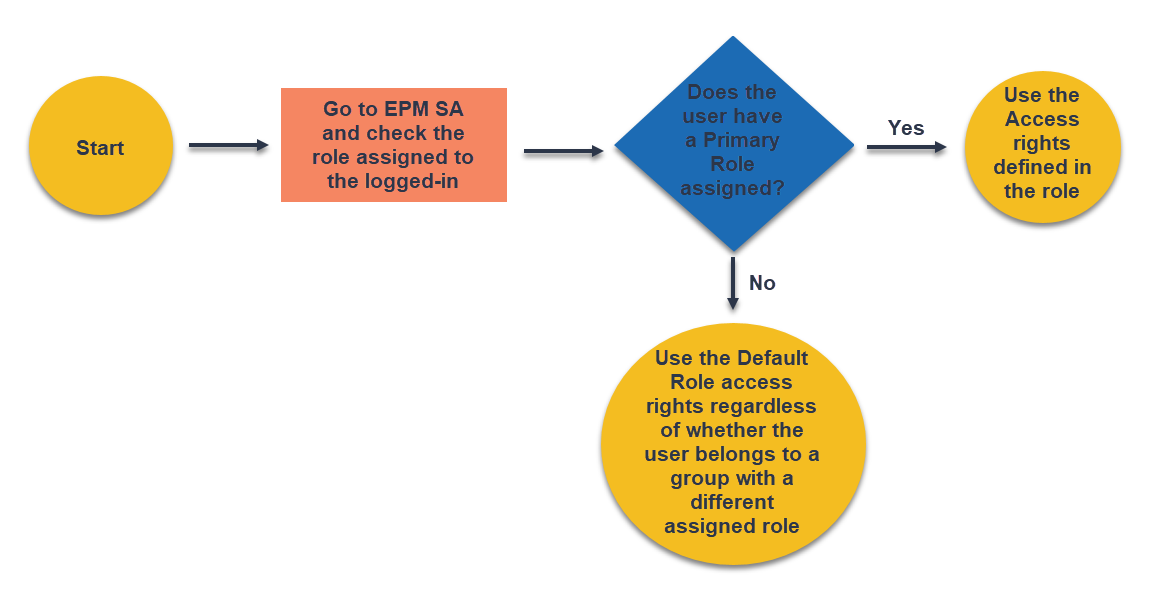
This diagram illustrates how Cobra implements the application-level security.
Menu Items Using Application-Level Security
This section lists the menu items secured at the application level. The items are grouped based on the Cobra ribbon tab where they are located.
- Integration Tab
- Schedule Integration (Open Plan, MS Project, Primavera, File)
- Actual Costs Integration
- Ancillary Data Integration
- Apportionment Integration
- Configuration Security
- Cost Data Export
- wInsight Export (XML/UNCEFACT)
- Reporting Tab
- Items under Reports Group (Run Report, Report Wizard, Recent Reports, Delete Report)
Note: This also requires displaying either the All Reports or Personal Reports view before enabling.
- Calculated Results
- Items under Batch Reports Group (Add, Copy, and Edit Batch Report)
Note: This also requires displaying the Batch Reports view before enabling.
- Items under Reports Group (Run Report, Report Wizard, Recent Reports, Delete Report)
- Tools Tab
- Align Time-phased Dates
- Zero-Out Data
- Update Codes
- Calculated Fields
- SQL Command Utility
- Process Logs