Calibrating Activities
Each row includes a duration calibration slider.
By default these sliders have 6 calibration levels:
| Calibration Level | Description |
|---|---|
| Off | No calibration required. |
| Dark Green | Requires much less time. |
| Light Green | Requires less time. |
| Yellow | Is realistic. |
| Orange | Requires more time. |
| Red | Requires much more time. |
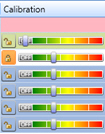
Calibration can only be used on scenarios.
Calibration works in a hierarchical manner. When you move a calibration slider for a parent node, calibration for the parent and all unlocked child nodes changes. In addition, the calibration padlock to the left of the parent slider changes to locked. When a node calibration is locked, its calibration level won't change when the calibration of a parent node is changed.