
Context Menu
Costpoint includes a Context Menu on the right side of the screen that provides quick access to commonly used commands and options.
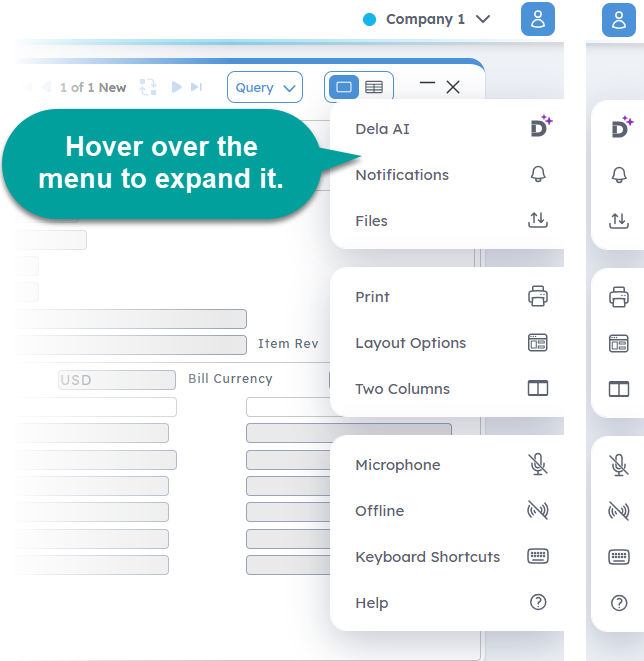
This menu is organized into three distinct sections:
- Top section: This displays global functions that are always available, regardless of the application or screen you are using.
- Middle section: This displays application-specific functions. Additional options, such as Wizard Mode and Two Columns, may also display here if they are supported by the application.
- Bottom section: This contains help and support-related functions that are always accessible.
Related Topics:
The Notifications option on the Context Menu opens system messages and alerts in a display box at the bottom of the screen.
Use Files on the Context Menu to upload files to Costpoint. You can access this menu item from any application.
Use the Layout Options feature on the Context Menu to customize your application view, including saving or resetting layouts, arranging table columns, and toggling screen controls.
The Microphone on the Context Menu turns on the Hey Deltek! virtual assistant, which listens to your voice commands to perform tasks in Costpoint and Costpoint Mobile.
Use the Make Available Offline feature to prepare and access Costpoint application records in Offline mode. Offline mode enables you to work in Costpoint applications without being connected to the internet.
This section displays actions available for the open application or active window, along with their corresponding keyboard shortcuts.
The online help function is easily accessible when you click Help on the Context Menu.